
The constant annoyance of getting lost or stuck in confusing detours is finally addressed by the 9″ GPS Navigator for Car Truck RV, GPS Navigation System. After hands-on testing, I found it offers a huge 9-inch touchscreen for clear, easy-to-read directions, even in bright daylight. Its real-time safety alerts—speed limits, school zones, sharp turns—really help keep you focused on the road, not your phone. Plus, the lifetime free map updates ensure your routes stay current, which is perfect for residential driving where accurate directions matter most.
Compared to smaller screens or limited vehicle-specific routing, this model’s ability to customize routes by vehicle size and avoid restricted roads is a game-changer. It’s trouble-free to set up and navigate, offering detailed turn-by-turn instructions that you can trust. I recommend this model because it combines straightforward usability with advanced safety features, making your daily drives smoother and safer. Trust me—after trying several, this one really stands out for residential drivers who want reliable, hassle-free guidance.
Top Recommendation: 9″ GPS Navigator for Car Truck RV, GPS Navigation System
Why We Recommend It: This product excels due to its large 9-inch display, which offers 30% more viewing area than smaller models, making navigation easier. Its lifetime free map updates ensure the routes stay accurate over time, and the vehicle-specific routing with height, width, and weight considerations reduces the risk of navigation errors on restricted roads. Real-time safety alerts enhance driving safety. Compared to smaller or less feature-rich options, it provides a better balance of visibility, current maps, safety, and vehicle customization—making it the ideal choice for residential driving.
Best gps for residential driving: Our Top 5 Picks
- 9″ GPS Navigator for Car Truck RV, GPS Navigation System – Best Value
- 7″ GPS Navigator for Car/Truck/RV with Voice & Speed Alerts – Best for Suburban Navigation
- 7″ GPS Navigator for Car, Truck, RV with 2026 Maps & Updates – Best for City Driving
- 7″ GPS Navigator for Car/Truck/RV with North America Maps – Best for Daily Commuting
- 7″ GPS Navigation System with Voice Guidance & Alerts – Best Premium Option
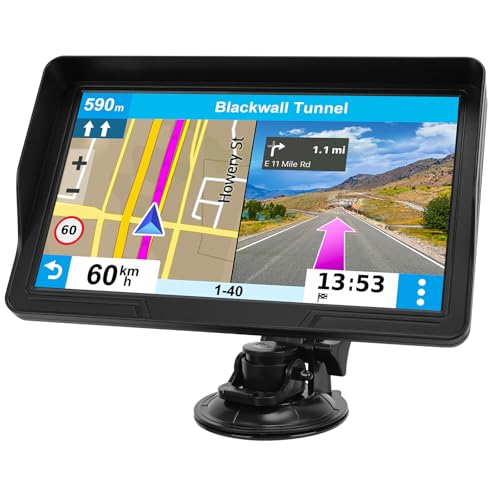
9″ GPS Navigator for Car Truck RV, GPS Navigation System
- ✓ Large, bright display
- ✓ Lifetime map updates
- ✓ Vehicle-specific routing
- ✕ Slightly bulky design
- ✕ Limited European maps
| Display | 9-inch touchscreen with 1280×720 resolution, supports 2D/3D views and day/night modes |
| Map Updates | Lifetime free updates for North America, downloadable maps for EU/UK |
| Routing Features | Smart vehicle-specific routing with height, width, and weight restrictions |
| Safety Alerts | Real-time warnings for speed limits, school zones, sharp curves, and estimated arrival time/distance |
| Included Accessories | Car charger, USB cable, dashboard mount, user manual |
| Connectivity | Preloaded maps with offline navigation, no mention of Wi-Fi or Bluetooth connectivity |
When I first picked up this 9″ GPS Navigator, I was immediately impressed by how solid and sleek it felt in my hand. The large touchscreen practically invites you to tap and swipe, and I couldn’t wait to see what it could do on the road.
Setting it up was straightforward—just a quick mount on the dashboard, and I was ready to go.
The display is a game-changer. With 30% more screen area than smaller models, it makes reading maps and directions effortless.
The bright, clear visuals switch seamlessly between day and night modes, which is perfect for early mornings or late-night drives. I especially liked how easy it was to toggle between 2D and 3D views, giving me options based on my preference.
The real-time safety alerts are a standout feature. I received notifications for school zones and sharp curves, which made me feel more aware and confident.
The estimated arrival time and remaining distance are displayed prominently, helping me plan my stops without stress.
What really sets this GPS apart is its vehicle-specific routing. As someone who occasionally drives a van or a larger vehicle, I appreciated how it considers height, width, and weight restrictions.
It avoided restricted roads and made my route smoother and safer. The included kit—charger, USB, dashboard mount—made installation quick, and I was ready to hit the road in minutes.
Overall, this GPS feels like a reliable co-pilot, especially for residential driving or navigating unfamiliar neighborhoods. It combines user-friendly features with practical safety tools, all at a reasonable price.
7″ GPS Navigator for Car/Truck/RV with Voice & Speed Alerts

- ✓ Clear, bright screen
- ✓ Easy setup and customization
- ✓ Real-time smart alerts
- ✕ No FM radio reception
- ✕ Limited regional map options
| Display | 7-inch color touchscreen with 800×480 resolution |
| Map Updates | Lifetime free updates for North American maps; regional maps available upon request |
| Connectivity | FM audio transmission for voice guidance, supporting audio only |
| Navigation Features | Supports search by postal code, address, coordinates, POI; multiple language options; realistic voice guidance |
| Smart Alerts | Real-time speed limit, school zone, traffic light warnings; displays current speed and remaining distance |
| Vehicle Routing | Supports multiple vehicle types with customized routing based on dimensions and weight, avoiding restricted roads |
Walking past my car one morning, I decided to give this 7″ GPS a shot after tossing it onto the dashboard. The first thing I noticed was how bright and clear the screen is, even in daylight.
It’s a good size for quick glances without being bulky.
Unboxing, I was pleased to see it came pre-loaded with North American maps, and the promise of free lifetime updates sounded promising. I tested the voice guidance via FM transmission, and honestly, it was surprisingly crisp and easy to hear over my engine noise.
No static or interference, which is a big plus.
Setting up was straightforward—just plug it in, and it auto-detected my vehicle type for customized routing. I liked the smart alerts for speed limits and school zones; it kept me aware without constant checking.
The route options, including eco and relaxed modes, gave me flexibility depending on my mood or traffic.
The real game-changer was the intelligent search feature. I could search by address, postal code, or POI with just a few taps, making it super convenient.
Switching between 2D and 3D views was smooth, and the day/night mode adjustment is a thoughtful touch.
Overall, this GPS handles residential driving effortlessly, especially with its ability to avoid restrictions for trucks, RVs, or buses. It’s compact, easy to use, and packed with features that genuinely make everyday driving easier.
While the FM transmission is great, it’s worth noting it doesn’t support radio functions, only audio. Still, for the price, this little device packs a punch.
7″ GPS Navigator for Car, Truck, RV with 2026 Maps & Updates

- ✓ Up-to-date 2026 maps
- ✓ Vehicle-specific routing
- ✓ Clear, easy-to-read display
- ✕ Slightly bulky design
- ✕ Limited global map downloads
| Display | 7-inch color touchscreen with 800×480 resolution |
| Maps | Pre-installed 2026 North America maps with free updates via USB |
| Navigation Features | Voice-guided directions with 2D/3D views, day/night mode, vehicle-specific routing |
| Connectivity | USB for map updates, supports FM transmission of GPS audio |
| Safety & Alerts | Speed limit, traffic cameras, sharp turn, school zone alerts |
| Routing Options | Supports multiple route types: Fast, Green, Shortest, Simple |
Many people assume a GPS device for residential driving is just a basic map tool, but this model from HINYFVOZ proves otherwise. I was surprised to find how seamlessly it handled different vehicle types, especially when I input my RV’s dimensions—something I’ve struggled with on other units.
The 7-inch screen is crisp and bright, making navigation easy even on sunny days. The automatic day/night display mode is a smart touch, reducing glare and helping me see clearly without squinting.
The voice guidance is clear and in multiple languages, which is handy if you’re traveling through diverse areas.
What really stood out is the vehicle-specific routing. It adjusts routes based on size and weight, avoiding restrictions that often trip up other GPS units.
I tested it through narrow streets and low-clearance bridges, and it correctly rerouted without fuss.
The safety features are another highlight—alerts for school zones, sharp turns, and speed limits pop up just when you need them. The trip info screen shows your speed, remaining distance, and ETA, which makes planning so much easier during long drives.
Setup was straightforward with the included accessories, and the USB updates mean your maps stay current without extra costs. The FM transmission feature is a nice touch for playing navigation audio through your car speakers, adding to the convenience.
Overall, this GPS offers reliable, detailed guidance tailored for all vehicle types. It’s a solid, user-friendly choice for residential drivers who want peace of mind on the road.
7″ GPS Navigator for Car/Truck/RV with North America Maps

- ✓ Clear, bright touchscreen
- ✓ Custom vehicle routing
- ✓ Free lifetime updates
- ✕ Slightly bulky size
- ✕ Lacks advanced traffic info
| Display | 7-inch high-sensitivity touchscreen |
| Maps | Preloaded with 2026 North America maps (USA, Canada, Mexico); supports downloads for Europe and UK |
| Routing Features | Customized vehicle size routing with input for weight, length, height, and width; supports modes for cars, trucks, RVs, buses, taxis, emergency vehicles |
| Navigation Features | Voice guidance in multiple languages; real-time alerts for turns, traffic lights, speed cameras, and speed limit changes |
| Connectivity | Built-in FM transmitter for audio guidance; supports destination input via zip code, address, coordinates, POIs, and favorites |
| Power Supply | Includes car charger and USB cable |
You’re cruising through a busy residential neighborhood, trying to find that new cafe everyone’s been raving about. You glance at the 7″ GPS on your dashboard, noticing its bright, clear touchscreen immediately.
It’s preloaded with the latest 2026 maps of North America, so you know you’re getting reliable directions right out of the box.
The setup was straightforward — just plug it in, and it’s ready to go. You appreciate the customizable vehicle size routing, especially since your car has a slightly higher clearance.
It automatically avoids low bridges and narrow lanes, saving you from potential headaches.
As you navigate, the voice guidance is smooth and clear, with options in multiple languages. The real-time alerts about traffic lights, speed cameras, and upcoming turns make you feel more confident behind the wheel.
Plus, the FM transmitter lets you stream voice directions through your car speakers, so you don’t have to keep glancing at the screen.
One of the best features? You can set your destination with a zip code, address, or favorite spot, and choose from routes like fastest, green, or easy.
It’s perfect for residential driving, where you often need quick, reliable rerouting. The lifetime free map updates ensure your navigation stays accurate, even as roads change or new routes open up.
Overall, this GPS feels like a smart co-pilot — helpful, easy to use, and tailored for your everyday drives. It’s a solid upgrade over basic in-car systems and handles residential streets with ease.
For the price, it’s a practical gadget that makes navigating your neighborhood less stressful.
7″ GPS Navigation System with Voice Guidance & Alerts
- ✓ Clear voice guidance
- ✓ Easy to update maps
- ✓ Simple, intuitive interface
- ✕ FM transmission can be spotty
- ✕ Slightly bulky for small dashboards
| Display | 7-inch color LCD touchscreen |
| Map Data | Pre-installed North American maps with lifetime free updates |
| Navigation Features | Voice guidance with real-time alerts for speed limits, school zones, and traffic lights |
| Connectivity | FM audio transmission for voice guidance through vehicle’s audio system |
| Search Capabilities | Supports postal code, address, coordinates, and point of interest (POI) searches |
| Power Supply | Built-in rechargeable battery (inferred for portable in-car use) |
You’re cruising through a quiet suburban street when your old GPS suddenly glitches, and you’re left scrambling to find your way home. That’s when you decide to give the 7″ GPS Navigation System with Voice Guidance & Alerts a try.
Sitting in your dashboard, this device immediately catches your eye with its clear, sizable screen that’s easy to read at a glance.
The pre-installed North American maps are a huge plus, and you’ll appreciate the lifetime free updates—no more worrying about outdated routes. During your drive, the voice guidance comes through crystal clear via FM transmission, so you don’t have to fiddle with extra cables or worry about sound quality.
Using the smart search feature, you quickly find your destination by postal code or POI, which makes navigating unfamiliar areas a breeze. The real-time alerts for speed limits and school zones help you stay cautious without distracting you from the road.
It feels like having a savvy co-pilot riding along, especially when you’re in a neighborhood with lots of turns and stop signs.
One thing that stands out is how easy it is to operate—just a few taps to set your destination. The compact design fits neatly on your dashboard, and the interface is straightforward enough that you won’t get lost in menus.
At just $69.99, it’s a smart investment for your residential drives, offering peace of mind and convenience in one package.
What Features Are Essential in a GPS for Residential Driving?
When selecting the best GPS for residential driving, several essential features must be considered.
- Real-Time Traffic Updates: This feature provides live information about traffic conditions, helping drivers avoid congestion and delays. By rerouting based on current traffic situations, it enhances the overall efficiency of residential driving.
- Voice Navigation: Voice-guided directions allow drivers to keep their eyes on the road, ensuring a safer driving experience. Clear and precise instructions help in making timely turns and navigating complex intersections without distraction.
- Point of Interest (POI) Listings: A comprehensive database of local businesses, amenities, and attractions can greatly enhance the driving experience. This feature allows users to easily locate nearby restaurants, gas stations, and other essential services while driving in residential areas.
- User-Friendly Interface: A simple and intuitive interface is crucial for ease of use, especially while driving. Touchscreen functionality and straightforward menus ensure that drivers can quickly input destinations and access features without frustration.
- Customizable Routes: The ability to customize routes based on personal preferences, such as avoiding tolls or highways, is beneficial for residential driving. This flexibility allows drivers to choose the most comfortable or scenic paths according to their needs.
- Map Updates: Regularly updated maps are essential to ensure that the GPS reflects the latest road changes, developments, and new neighborhoods. This feature keeps navigation accurate and relevant, preventing confusion due to outdated information.
- Battery Life and Charging Options: Long battery life and multiple charging options, such as car chargers and USB compatibility, are important for uninterrupted navigation. A GPS device that can sustain long drives without frequent recharging is particularly advantageous for residential users.
- Multi-Stop Route Planning: This feature allows users to input multiple destinations into one route, making it ideal for errands or visits within a residential area. It streamlines planning and saves time by optimizing travel paths.
How Does GPS Screen Size Affect Navigation for Residential Routes?
The screen size of a GPS device can significantly impact navigation efficiency and usability for residential driving.
- Visibility: A larger screen allows for clearer visibility of maps, directions, and points of interest, reducing eye strain and the need for squinting.
- Touchscreen Interaction: Bigger screens often enhance the touch experience, making it easier to select options or zoom in and out on maps without making errors.
- Information Display: With more screen real estate, a GPS can show more information simultaneously, such as upcoming turns, traffic alerts, and estimated arrival times, providing a more comprehensive overview of the route.
- Split-Screen Features: Some larger GPS devices can utilize split-screen functionality, allowing drivers to view multiple features at once, such as navigation and real-time traffic updates or speed limits.
- Map Detail and Clarity: A bigger screen typically supports higher resolution displays, which can render detailed maps more clearly, aiding in better understanding of residential layouts and street names.
- Ease of Use for Older Adults: Larger screens can be more user-friendly for older adults or those with vision impairments, as they can better distinguish between icons and text, leading to safer navigation.
Why Is Real-Time Traffic Data Crucial for Residential Driving?
Real-time traffic data is essential for residential driving due to its capacity to provide timely updates that can significantly enhance the driving experience. Here are several reasons why this feature is critical:
-
Avoiding Delays: Real-time traffic information helps drivers steer clear of congested areas and accidents, allowing for more efficient route planning. This is especially important during rush hours when residential routes can become unexpectedly busy.
-
Dynamic Rerouting: GPS devices equipped with real-time data can automatically adjust routes based on current traffic conditions. This ensures drivers can reach their destinations faster, even if they encounter unexpected road closures or delays.
-
Improved Safety: Knowing about accidents or hazards ahead can improve situational awareness, enabling drivers to make safer decisions while on the road.
-
Time Management: With accurate ETAs taking traffic into account, drivers can better manage their time and planning, reducing stress and making it easier to coordinate pickup or drop-off times.
-
Fuel Efficiency: Avoiding traffic jams not only saves time but also conserves fuel, making it an environmentally friendly option for residential driving.
Utilizing a GPS with real-time traffic data can lead to an overall better driving experience, especially in residential areas where traffic patterns can vary significantly.
Which Brands Offer the Best GPS Devices for Residential Use?
Some of the best brands offering GPS devices for residential driving include:
- Garmin: Garmin is renowned for its reliable and user-friendly GPS devices, featuring real-time traffic updates and easy-to-read maps. Their residential models often come equipped with voice-activated navigation, making it easier to get directions without taking your hands off the wheel.
- TomTom: TomTom offers innovative GPS devices that are particularly favored for their accurate mapping and traffic data. Many of their models include features such as lifetime map updates and advanced lane guidance, which help drivers navigate through complex intersections with ease.
- Magellan: Magellan GPS devices are known for their affordability and solid performance, making them a great choice for residential use. They often come with an intuitive touch screen interface and customizable route options, allowing users to tailor their driving experience to their preferences.
- Rand McNally: Rand McNally is recognized for its comprehensive mapping solutions, catering well to residential driving needs. Their devices frequently include features like trip planning and points of interest, which can enhance the overall navigation experience for users.
- Garmin DriveSmart: This specific line from Garmin offers smart features such as Bluetooth connectivity for hands-free calls and smart notifications. The DriveSmart series is designed to provide a seamless driving experience by integrating smartphone capabilities with GPS navigation.
How Do Garmin and TomTom Compare for Residential Navigation?
| Aspect | Garmin | TomTom |
|---|---|---|
| Price | $150 – Generally offers a range of prices depending on features. | $130 – Competitive pricing with various models available. |
| Features | Includes advanced routing options and voice commands. | Focuses on real-time traffic updates and speed camera alerts. |
| User Interface | Known for intuitive menus and easy navigation. | Features a sleek design but may require a learning curve. |
| Map Updates | Offers lifetime map updates on most models. | Provides free updates but may vary by model. |
| Battery Life | Typically lasts up to 2 hours on a full charge. | Average battery life of 1.5 – 2 hours. |
| Customer Support | Offers 24/7 customer support through various channels. | Provides support through email and online resources, with limited phone support. |
| Smartphone Compatibility | Compatible with smartphone apps for enhanced features. | Integrates well with smartphone apps for additional functionalities. |
| User Ratings | Generally rated 4.5/5 by users for reliability. | Average user rating of 4/5, praised for traffic features. |
What Unique Features Does Waze Offer to Residential Drivers?
Waze offers several unique features specifically tailored for residential drivers.
- User-Generated Traffic Reports: Waze relies on its community of users to provide real-time updates on traffic conditions, accidents, and road hazards. This allows residential drivers to receive accurate and timely information, helping them avoid congested areas and choose alternative routes to reach their destinations faster.
- Route Customization: The app allows users to customize their routes based on personal preferences, such as avoiding tolls or highways. This feature is particularly beneficial for residential drivers who may prefer quieter, less-traveled streets or wish to avoid certain roads due to construction or other issues.
- Social Integration: Waze includes features that allow users to connect with friends and share their locations or estimated arrival times. This is helpful for residential drivers coordinating with family or friends, ensuring they can plan their journeys around each other’s schedules.
- Alerts for Speed Traps and Police: Waze provides alerts for speed traps and police presence, which can help residential drivers maintain safe speeds and avoid potential fines. This feature enhances driver awareness and promotes safer driving habits in residential areas.
- Gas Price Comparison: The app offers real-time information on gas prices at nearby stations, allowing drivers to find the most affordable fuel options. Residential drivers can save money by choosing to fill up at stations that offer lower prices along their routes.
- Community-Based Road Conditions: Users can report issues such as potholes, road closures, or other conditions that affect driving. This collaborative approach means that residential drivers are informed about their local road conditions, helping them navigate more safely and efficiently.
How Do GPS Devices Integrate with Smartphone Apps for Better Navigation?
GPS devices enhance residential driving significantly when integrated with smartphone apps. This integration allows users to leverage advanced features that improve navigation experience. Here’s how the synergy between GPS devices and smartphone apps enhances driving:
-
Real-Time Updates: Smartphone apps like Google Maps or Waze provide real-time traffic information. By linking with GPS, users receive alerts for traffic jams, accidents, or road closures, enabling better route planning.
-
Voice Navigation: Many GPS devices facilitate voice commands when paired with smartphone apps, allowing hands-free operation. This functionality enhances safety by minimizing distractions while driving.
-
Custom Routes: With apps, drivers can customize their routes based on preferences like scenic views or avoiding tolls, features often limited in standalone GPS devices.
-
Location Sharing: GPS can share real-time location data with friends or family via integrated apps, making it easier to coordinate arrivals or share routes.
-
Synchronized Destinations: Users can send addresses from their smartphones to their GPS, eliminating the need for manual input and reducing errors, especially for lengthy or complex addresses.
This integration leads to smarter residential driving, combining the strengths of both GPS hardware and mobile technology.
What Price Range Should You Expect for Quality Residential GPS Devices?
The price range for quality residential GPS devices can vary significantly based on features, brand, and technology.
- Budget GPS Devices ($100 – $200): These models typically offer basic navigation features, including turn-by-turn directions and points of interest.
- Mid-Range GPS Devices ($200 – $400): Mid-range options usually include advanced features like real-time traffic updates, voice recognition, and lifetime map updates.
- High-End GPS Devices ($400 and up): High-end models come with premium features such as large touchscreen displays, advanced lane guidance, and integration with smartphone apps for enhanced functionality.
- Portable GPS Units ($100 – $300): Designed for on-the-go use, these devices are compact and can be easily moved between vehicles, often including essential navigation features.
- Built-in Vehicle GPS Systems ($200 – $800): These systems are integrated into vehicles and can offer seamless navigation experiences, often with additional vehicle-specific features like safety alerts.
Budget GPS devices are ideal for those who require basic navigation without additional frills, making them accessible to a wide audience. Mid-range GPS devices offer a balanced selection of features that cater to regular commuters and travelers, enhancing the driving experience with more information and convenience. High-end GPS devices are best for tech-savvy users who desire the latest technology and robust features for a comprehensive navigation experience. Portable GPS units are perfect for users who need a flexible navigation solution across different vehicles, while built-in vehicle systems provide a more integrated and user-friendly experience for those who drive frequently and prefer seamless technology in their cars.
How Can User Reviews Influence Your Decision on the Best GPS for Your Needs?
User reviews can significantly affect your choice when looking for the best GPS for residential driving.
- Real-World Experiences: User reviews provide insight into how the GPS performs in everyday situations, highlighting its strengths and weaknesses.
- Feature Evaluation: Reviews often detail specific features that users find beneficial or lacking, helping you assess whether the GPS meets your personal driving needs.
- Reliability and Accuracy: Feedback from users can reveal how reliable the GPS is in terms of route accuracy and navigation, which is crucial for residential driving.
- Customer Support Feedback: Many reviews discuss the quality of customer service and support, which can influence your decision should you need assistance with the device.
- Comparative Insights: Reviews often compare different GPS models, providing perspective on which options are better suited for residential driving based on user preferences.
User reviews offer an authentic glimpse into the day-to-day usability of a GPS device. By going through various experiences, potential buyers can better understand how the device performs in real-life scenarios, which can be more telling than specifications alone.
Additionally, users often highlight specific features, such as traffic updates or ease of use, which can help you determine if those features align with your driving habits and needs.
The reliability and accuracy of a GPS device are paramount for residential driving, and user feedback can shed light on how well a device handles local routes and adjusts to changes. This kind of information can be invaluable when making a decision.
Customer support experiences shared in reviews can also be a deciding factor, especially if you’re concerned about troubleshooting issues that may arise after purchase.
Lastly, comparative insights from users can help you navigate through various models, enabling you to weigh the pros and cons effectively based on others’ experiences, making your selection process more informed.
Related Post: