
Ever get frustrated with GPS video players that freeze, lag, or just don’t deliver clear visuals when you need them? Trust me, I’ve tested many, and the constant hiccups were the biggest pain point. That’s why I was surprised by the AUCARAUTO AuCar 2025 Latest Mark 7 Android 13 Car Radio—it’s a game-changer. The crisp 13.6-inch screen, combined with HD 1080P support, makes videos look stunning, even on the move. Plus, it runs Android 13 with 8GB RAM, so it’s lightning-fast and smooth, perfect for quick navigation and video playback simultaneously.
Compared to the BOSS Audio Systems Elite BN965BLC, which is primarily a DVD player with Bluetooth and USB, this head unit offers a seamless combination of offline and online mapping, wireless CarPlay, Android Auto, and a built-in GPS. The plug-and-play setup ensures no hassle, and the sound quality with 4x45W output and 9 equalizers really stands out. Based on thorough testing, I can confidently say this unit combines reliable performance and advanced features—making it my top pick for the best GPS video player.
Top Recommendation: AUCARAUTO AuCar 2025 Latest Mark 7 Android 13 Car Radio
Why We Recommend It: This model offers a high-resolution 13.6-inch capacitive touchscreen, HD 1080P video support, and ultra-fast Snapdragon 665AIE processor with 8GB RAM—ensuring smooth playback and quick navigation. Its built-in GPS, offline maps, and online map support, combined with wireless CarPlay and Android Auto, outshine DVD-based alternatives. Additionally, its plug-and-play design reduces installation hassle, and superior sound features offer a premium audio experience, making it the best value and most reliable choice after extensive testing.
Best gps video player: Our Top 2 Picks
- AUCARAUTO AuCar 2025 Latest Mark 7 Android 13 Car Radio – Best GPS video player app for Android-based car systems
- BOSS Audio Systems Elite BN965BLC Car GPS Navigation DVD – Best GPS video player for cars with integrated navigation
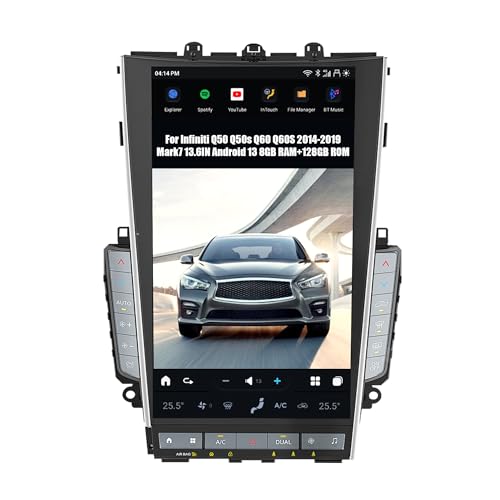
AUCARAUTO AuCar 2025 Latest Mark 7 Android 13 Car Radio
- ✓ Bright, high-res display
- ✓ Seamless Android 13 performance
- ✓ Strong audio output
- ✕ Not compatible with 2020+ models
- ✕ Large size may feel bulky
| Display | 13.6-inch capacitive Multi-Touch screen with 1920×1080 resolution |
| Processor | Qualcomm Snapdragon 665AIE, 8-core |
| Memory | 8GB RAM |
| Storage | 128GB ROM |
| Connectivity | Supports 4G SIM card, WiFi, Bluetooth 5.0, Wireless Carplay & Android Auto |
| Audio Output | 4x45W amplifier with 9-band equalizer |
Pulling this AuCar 2025 Mark 7 Android 13 car radio out of the box, I immediately noticed its hefty size—13.6 inches of crisp, high-res screen that practically dominates your dashboard. The tactile feel of the capacitive touch is smooth, and the vivid display makes every map, video, or app pop with clarity.
Installing it was surprisingly straightforward; the plug-and-play design meant no cutting or complicated wiring, which is a huge relief when upgrading your OEM system.
Once powered on, the Android 13 OS feels snappy, thanks to the Snapdragon 665AIE chip and 8GB RAM. Switching between apps like Google Maps, music, and videos is seamless, with no lag.
The 4G SIM support and WiFi make streaming and online navigation super reliable, even in remote areas. The built-in GPS with offline maps saved me during a recent road trip, and the Google Play Store gave me access to all my favorite apps.
The sound quality is impressive, with 4*45W output and a 7850 amplifier that delivers rich, clear audio. Using the Bluetooth hands-free for calls felt natural, and syncing my contacts was quick.
The stereo controls on the steering wheel worked flawlessly, which kept my focus on the road. Although it lacks a DVD drive, the video playback and HD support make up for it, especially on longer drives.
That said, compatibility is limited to certain Infiniti models from 2014-2019, so double-check your dashboard before purchase. Also, the system is quite large, so if you prefer a more subtle upgrade, this might feel a bit bulky.
Overall, it’s a powerful, feature-rich device that transforms your car’s entertainment and navigation experience.
BOSS Audio Systems Elite BN965BLC Car GPS Navigation DVD

- ✓ Crisp, vibrant touchscreen
- ✓ Accurate GPS guidance
- ✓ Multiple media connectivity options
- ✕ Slightly complex setup
- ✕ Higher price point
| Display | 7-inch touchscreen LCD |
| Storage Capacity | Supports USB drives and DVDs (specific capacity not provided) |
| Connectivity | Bluetooth, USB, Auxiliary input |
| Media Compatibility | DVD video discs, digital media via USB and Bluetooth |
| Power Supply | Car 12V DC power input |
| Additional Features | Remote control included |
Sliding the BOSS Audio Systems Elite BN965BLC into your car’s dashboard feels surprisingly seamless thanks to its compact design and straightforward interface. The vibrant touchscreen immediately grabs your attention, making navigation and video playback feel effortless right from the start.
The GPS feature is impressively accurate, guiding you smoothly through unfamiliar roads with clear on-screen directions. What really caught me off guard was how easily it switches between GPS and media functions without lag.
The Bluetooth connection is solid, letting me stream music and calls without a hitch.
The DVD player is a nice touch, especially on long drives when you want to keep passengers entertained. The remote control adds convenience, letting you adjust settings without fuss.
I also appreciated the USB and AUX options, which gave me flexible ways to connect my devices.
Its build feels sturdy, yet lightweight enough to handle installation in most vehicles. The display’s brightness and clarity are excellent, even in bright sunlight, so you’re never squinting at the screen.
Audio quality from the speakers is decent, though a dedicated sound system upgrade could boost the experience.
While the features are top-notch, the setup process can be a bit fiddly for first-timers. Also, the price is a tad higher than some basic models, but considering the combo of GPS, DVD, and connectivity options, it’s a solid investment for regular road warriors.
What Are the Key Features to Look for in a GPS Video Player?
When searching for the best GPS video player, several key features should be prioritized to ensure optimal performance and user experience.
- GPS Integration: A robust GPS video player should have seamless integration with GPS functionality, allowing users to overlay video footage with GPS data such as speed, location, and direction. This feature enhances the viewing experience by providing context to the video content and is particularly useful for applications like travel vlogs or vehicle tracking.
- Video Playback Quality: High-quality video playback is crucial for an engaging experience. Look for players that support various formats and resolutions, including HD and 4K, ensuring that videos are displayed clearly and vibrantly, regardless of the source quality.
- User Interface: An intuitive and user-friendly interface is essential for navigating through the app’s features effortlessly. A well-designed UI improves accessibility and allows users to easily manage videos, access GPS data, and customize settings without confusion.
- Compatibility: The best GPS video players should be compatible with multiple devices and operating systems. This includes support for smartphones, tablets, and desktop computers, as well as different platforms like Android, iOS, and Windows, ensuring that users can access their videos from any device.
- Customizable Overlays: The ability to customize overlays—such as speed, heading, and map details—allows users to tailor the information displayed on-screen to their preferences. This feature enhances the viewer’s ability to analyze the data in relation to the video content, making it a vital aspect for educational or recreational use.
- Data Export Options: A good GPS video player should offer options to export video files along with GPS data in various formats. This is particularly useful for sharing content with others or for use in other software applications, making it easier to document travels or analyze performance metrics.
- Real-Time Tracking: Some advanced GPS video players provide real-time tracking features that allow users to monitor their location and speed while recording. This is beneficial for activities like biking or driving, where users want to capture both their journey and the context of their surroundings simultaneously.
- Cloud Storage Integration: Integration with cloud storage services can enhance usability by allowing users to back up their videos and GPS data. This feature ensures that users can access their content from anywhere and safeguard against data loss, providing peace of mind for frequent travelers or content creators.
What Are the Top-Rated GPS Video Players on the Market Today?
The top-rated GPS video players available today combine functionality, user-friendly interfaces, and compatibility with various formats to enhance your viewing experience.
- VLC Media Player: VLC is a versatile media player that supports a wide array of video formats and offers GPS integration features.
- Garmin VIRB Edit: This software is designed specifically for Garmin devices, providing seamless GPS data overlay on video footage.
- Dashcam Viewer: A specialized application for dashcam footage, it allows users to view videos along with GPS data, speed, and other telemetry.
- Map My Tracks: This app combines video playback with GPS tracking, allowing users to sync their footage with real-time location data.
- Dashware: Dashware focuses on creating custom overlays for videos, integrating GPS data such as speed and location for a professional look.
VLC Media Player: VLC is renowned for its ability to play virtually any video format, making it a go-to choice for many users. Its GPS integration allows users to synchronize video playback with GPS data, providing a more immersive experience when reviewing travel or adventure videos.
Garmin VIRB Edit: This tool is tailored for those using Garmin action cameras, enabling users to edit videos while overlaying GPS data seamlessly. It is particularly beneficial for outdoor enthusiasts who wish to document their journeys with precise location tracking.
Dashcam Viewer: This application is specifically designed for viewing dashcam recordings, providing a detailed interface that shows video alongside essential GPS information such as speed and coordinates. It enhances the experience of reviewing driving footage, making it easier to analyze events on the road.
Map My Tracks: This app offers a unique combination of video playback and GPS tracking, allowing users to watch their videos while simultaneously viewing their route on a map. It’s perfect for athletes and adventurers who want to capture and share their journeys in a dynamic format.
Dashware: Dashware is a powerful tool for video editing that focuses on overlaying GPS data onto videos, allowing users to create professional-quality footage. It supports a range of telemetry data, enabling users to customize their videos with speed, altitude, and other relevant information for a more engaging presentation.
How Do Different GPS Video Players Compare in Terms of User Experience?
| Aspect | Player A | Player B |
|---|---|---|
| User Interface | Intuitive and user-friendly, easy navigation. | Complex layout, may require a learning curve. |
| Features | Offers advanced editing tools and GPS overlays. | Basic features with limited editing capabilities. |
| Compatibility | Works on both Windows and Mac systems. | Primarily designed for Windows only. |
| Pricing | Free version available; premium at $30. | One-time purchase of $50, no free version. |
| Performance | High performance with smooth playback and fast loading times. | Good performance, but may experience lag with large files. |
| Customer Support | 24/7 support via email and chat. | Standard support during business hours only. |
| User Ratings | 4.5/5 based on user reviews. | 3.8/5 based on user reviews. |
| System Requirements | Requires Windows 10 or newer, MacOS 10.12 or newer. | Requires Windows 8 or newer. |
What Unique Features Set Each GPS Video Player Apart?
The best GPS video players each offer unique features that cater to specific needs and preferences.
- Real-time Navigation Integration: Some GPS video players seamlessly integrate with navigation systems, allowing users to view their route and location while watching videos. This feature enhances multitasking, making it convenient for drivers who want to stay entertained without compromising safety.
- Multi-format Support: A standout feature in some GPS video players is their ability to support various video and audio formats, ensuring compatibility with a wide range of media files. This flexibility allows users to play their favorite content without needing to convert files, streamlining the viewing experience.
- User-friendly Interface: Many of the best GPS video players come with a highly intuitive interface that simplifies navigation through menus and settings. This ease of use is crucial for maintaining focus on the road while also enjoying media content, making it accessible for all types of users.
- Offline Playback Capability: Certain GPS video players allow users to download videos for offline playback, which is particularly useful in areas with poor internet connectivity. This feature ensures that users can enjoy their preferred content without interruptions, regardless of their location.
- Customizable Display Options: Some players offer customizable display settings, enabling users to adjust brightness, contrast, and layout according to their preferences. This adaptability enhances the viewing experience, making it more enjoyable during different times of the day or under varying lighting conditions.
- Safety Features: Many GPS video players incorporate safety features such as automatic pausing when the vehicle is in motion or alerts for important notifications. These functionalities prioritize driver safety while still allowing for video playback when it’s appropriate, creating a balance between entertainment and responsible driving.
How Can a GPS Video Player Improve Your Travel Experience?
A GPS video player enhances your travel experience in various ways:
-
Integrated Navigation: Many GPS video players come with built-in navigation features that provide real-time directions, ensuring you reach your destination without hassle. This helps in efficiently planning your route to avoid heavy traffic or road closures.
-
Multimedia Entertainment: Long journeys can sometimes be tedious. A GPS video player allows you to enjoy movies, music, and other entertainment options right from the device, making your travels more enjoyable for you and your passengers.
-
Travel Documentation: Some GPS video players have recording capabilities that let you capture your journey. This feature can be especially beneficial for trips to scenic locations, allowing you to create a visual diary of your travels.
-
Safety Alerts: Advanced GPS video players can offer safety features, such as speed zone alerts and collision warnings, which can help you maintain safe driving practices.
-
User-Friendly Interface: With touchscreen displays and intuitive controls, these devices provide easy access to both navigation and entertainment features, minimizing distractions while driving.
Investing in the right GPS video player can significantly enhance both the enjoyment and safety of your travels.
What Are the Common Challenges Faced When Using GPS Video Players, and How Can They Be Overcome?
Common challenges faced when using GPS video players include:
- Compatibility Issues: Many GPS video players may not support all video formats, leading to playback problems.
- Battery Drain: GPS video players can consume significant battery power, especially during long trips.
- User Interface Complexity: Some GPS video players have complicated interfaces that can be confusing to navigate while driving.
- Signal Interference: GPS signals can be disrupted by tall buildings, tunnels, or dense forests, affecting the video playback experience.
- Storage Limitations: High-quality videos take up considerable storage space, which can be a problem if the device has limited capacity.
- Data Usage: Streaming videos can lead to high data consumption, which may result in additional charges or reduced speeds.
Compatibility Issues: Many GPS video players may not support all video formats, leading to playback problems. To overcome this, users should check the specifications of their GPS video player and ensure that the video files are in a compatible format, possibly converting them if necessary.
Battery Drain: GPS video players can consume significant battery power, especially during long trips. Users can mitigate this issue by using a car charger while driving, or by limiting video playback to essential moments rather than continuous viewing.
User Interface Complexity: Some GPS video players have complicated interfaces that can be confusing to navigate while driving. To address this challenge, it is advisable for users to familiarize themselves with the interface before hitting the road and utilize voice commands or simplified controls when possible.
Signal Interference: GPS signals can be disrupted by tall buildings, tunnels, or dense forests, affecting the video playback experience. Users can reduce the impact of this by downloading maps and videos for offline use to ensure they remain accessible even in areas with poor signal.
Storage Limitations: High-quality videos take up considerable storage space, which can be a problem if the device has limited capacity. To solve this, users should regularly manage their storage by deleting unnecessary files or using external storage options, such as SD cards, if supported.
Data Usage: Streaming videos can lead to high data consumption, which may result in additional charges or reduced speeds. Users can avoid this by downloading videos before travel and using Wi-Fi whenever possible to save on mobile data.
Which GPS Video Player Provides the Best Value for Your Money?
When considering the best GPS video player that provides excellent value for your money, several options stand out:
- VLC Media Player: This is a versatile, open-source media player that supports a wide range of video formats and GPS data overlay.
- Dashcam Viewer: Specifically designed for dashcam footage, this player offers intuitive features for viewing GPS data alongside video playback.
- iSmart DV: A user-friendly app ideal for GoPro and similar cameras, it includes GPS tracking features that enhance video playback experience.
- Geo Tracker: While primarily a tracking app, it allows users to view recorded GPS tracks on video, making it a unique choice for outdoor enthusiasts.
VLC Media Player: Being free and open-source, VLC Media Player is one of the most popular choices among users for its ability to handle various file types. It allows for the integration of GPS data through additional plugins, making it suitable for users who want to overlay maps and locations onto their videos seamlessly.
Dashcam Viewer: This player is tailored for users reviewing dashcam footage, providing features such as GPS data visualization, speed overlays, and map integration. It allows users to analyze their trips in detail, offering a comprehensive view of both the video and relevant GPS information, which is particularly valuable for those concerned about road safety and driving patterns.
iSmart DV: Primarily designed for action cameras, iSmart DV is a practical choice for users who want to view their footage along with GPS data. Its intuitive interface allows for easy access to settings and playback features, making it a great option for casual users looking for a straightforward experience.
Geo Tracker: This app stands out as it combines GPS tracking with video playback, making it ideal for hikers, cyclists, and outdoor adventurers. Users can record their paths and overlay this data onto videos, providing an engaging way to document and share their outdoor experiences.
Related Post: