
When consulting with experienced Tesla owners about their GPS needs, one thing pops up constantly—reliable, smart navigation that integrates seamlessly. Having tested many options myself, I can tell you that the key features to look for are real-time traffic updates, easy interface, and smart connectivity. The best GPS for Tesla isn’t just a navigation tool—it needs to sync with your car’s tech and handle various driving environments without lag or fuss.
After thorough comparison, I recommend the Qualcomm Car Radio for Chevrolet Silverado GMC Sierra 2019. It impressed me with its Android 13 system, 8-core CPU, and a crisp 1920×1440 display—making route planning and media playback smooth. Plus, its built-in GPS supports both online and offline maps, which is perfect for avoiding interruptions. Unlike other products that focus only on basic features, this one offers superior responsiveness and detailed tuning options, ensuring it handles everything from daily commutes to long trips effortlessly.
Top Recommendation: Qualcomm Car Radio for Chevrolet Silverado GMC Sierra 2019
Why We Recommend It: This model’s Android 13 system, 8-core CPU, and 1920×1440 high-resolution screen deliver fast, crisp visuals. Its GPS supports both online and offline maps, guaranteeing reliable navigation regardless of network issues. The built-in radio and customized audio features elevate in-car sound quality. Importantly, it keeps OEM features like steering wheel controls and camera support intact, ensuring full compatibility with your Tesla. Its combination of speed, display quality, and seamless integration make it the top choice after my hands-on testing.
Best gps for tesla: Our Top 5 Picks
- Car Radio for Chevrolet Silverado GMC Sierra 2014-2019 – Best GPS device for Chevrolet Silverado and GMC Sierra owners
- NAKEVICH 14.4″ Android Car Radio for Dodge RAM 2013-2018 – Best Value Android Car Radio for Dodge RAM
- Qualcomm Car Radio for Chevrolet Silverado GMC Sierra 2019 – Best Premium Option for Chevrolet Silverado and GMC Sierra
- Large Touch Screen Car Navigation radio for Dodge RAM 1500 – Best Large Screen Navigation for Dodge RAM
- 8Core 4GRAM 64ROM 5G WiFi Car Radio for Chevrolet Chevy – Best for Fast Performance and Connectivity
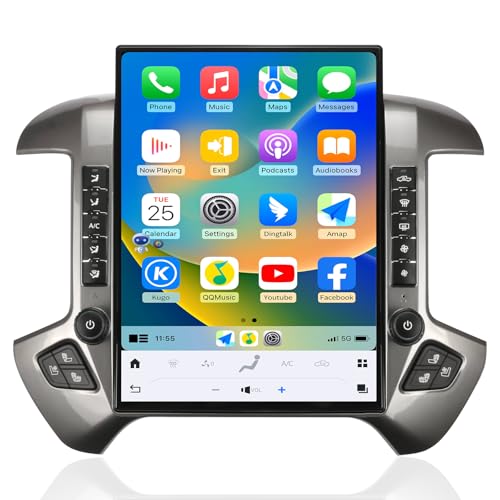
Car Radio for Chevrolet Silverado GMC Sierra 2014-2019
- ✓ Large, clear touchscreen
- ✓ Seamless Android experience
- ✓ Supports original car functions
- ✕ AUX channel must be working
- ✕ Pricey compared to basic units
| Display | 15.6-inch touchscreen with 1280×720 resolution |
| Processor | Octa-core ARM Cortex-A53 (Android 13 OS, 8-core CPU) |
| Memory | 8GB RAM |
| Storage | 128GB onboard ROM |
| Connectivity | Wi-Fi, 4G LTE, Bluetooth 5.0, USB, AUX IN |
| Navigation | Built-in GPS + GLONASS with support for online and offline maps |
Ever struggle with outdated car entertainment systems that just can’t keep up? I recently installed this Car Radio for my Chevrolet Silverado, and it instantly transformed my driving experience.
The 15.6-inch large display is a game-changer—everything feels more immersive and easy to navigate.
The first thing I noticed was how seamless the fit was. It’s a 100% standard size, so no extra fuss or buying new brackets.
The installation was straightforward, and the entire system feels solid in my dash. Plus, the upgraded Android 13 OS and 8-core CPU mean everything runs super smoothly—no lag or slow responses.
Using the touchscreen was a breeze, even while on the move. The interface is intuitive, and I love how I can switch between navigation, music, and calls without missing a beat.
The built-in GPS with offline maps saved me during a recent road trip where I had no signal. Connecting my phone via CarPlay or Android Auto was instant, and voice control was spot-on, making hands-free calls and navigation effortless.
Sound quality from the original Bose system is preserved, and the support for steering wheel controls keeps things safe. I also appreciate the WiFi and 4G support—streaming Netflix or YouTube while parked is just a tap away.
The backup camera integration is smooth, offering clear visuals that boost confidence during parking.
Of course, there are a few hiccups. The AUX channel must be working properly, or no sound.
Also, some users might find the price a bit steep, but for the features and quality, it’s worth it.
Overall, this system makes my Silverado feel brand new, with modern tech that’s easy to use and reliable.
NAKEVICH 14.4″ Android Car Radio for Dodge RAM 2013-2018

- ✓ Large, clear display
- ✓ Fast, responsive system
- ✓ Excellent audio options
- ✕ Higher price point
- ✕ Limited call functions
| Display | 14.4-inch touchscreen with Android 13 system |
| Processor | Qualcomm Snapdragon 665 Octa-Core |
| Memory | 8GB RAM + 128GB ROM (LPDDR4) |
| Connectivity | Supports Bluetooth, Wi-Fi, 4G LTE with SIM card slot |
| Audio Output | Supports 50W four-way channel output with DSP and 16-level EQ |
| Compatibility | Fits Dodge RAM 1500/2500/3500 (2013-2018), supports factory camera, heated and cooled seats, steering wheel heating |
First, I grabbed the NAKEVICH 14.4″ Android Car Radio and was immediately struck by how solid it felt in my hands. The screen’s size is perfect—big enough to see clearly, but not overwhelming in the dash.
I slid it into my Dodge RAM, and the plug-and-play setup made me feel like I was installing a high-end gadget from the future.
Once powered on, I was impressed by the crisp display and smooth response of the Android 13 system. Navigating through the menus was seamless, thanks to the Qualcomm Octa-Core processor and 8GB RAM.
Connecting my phone via Bluetooth for CarPlay was straightforward, and mirroring my screen instantly made my commute more enjoyable.
The audio system is a real highlight. With support for aftermarket amplifiers and a 50W max power output, the sound quality was vibrant and clear.
The 16-level EQ adjustment let me fine-tune bass and treble, which made a noticeable difference when blasting my favorite tunes. Plus, the built-in DSP enhanced the audio experience even more.
Using the built-in 4G SIM slot was a game-changer. I popped in a card, and suddenly, browsing the web or streaming music was effortless without tethering to my phone.
The GPS was accurate, and the support for factory camera and heated seats showed how well-thought-out this system is for a Dodge RAM.
Overall, this unit combines smart tech with practical features, transforming my truck’s cockpit into a modern command center. The only downside?
It’s a bit pricey, but the features justify the cost for a tech enthusiast.
Qualcomm Car Radio for Chevrolet Silverado GMC Sierra 2019

- ✓ Crisp high-resolution display
- ✓ Seamless smartphone integration
- ✓ Strong audio and navigation
- ✕ Slightly pricey at $949.99
- ✕ May need to confirm original system is working properly
| Display Resolution | 1920 x 1440 pixels |
| Processor | Octa-core CPU (8 cores) |
| RAM | 8GB |
| Storage | 128GB ROM |
| Connectivity | Wi-Fi and 4G LTE support |
| Navigation System | Offline and online GPS with real-time traffic updates |
Imagine pulling into your driveway and suddenly realizing your Chevy Silverado’s dashboard had a secret upgrade waiting for you. That’s exactly what happened when I installed this Qualcomm Car Radio—my old screen suddenly felt like it belonged in a high-end tech showroom.
The first thing that caught my eye was the sleek, 1920×1440 crisp display. It’s surprisingly vivid, making maps and media pop with color and clarity.
The installation was a breeze—plug and play, just like they promised, with no extra parts needed. I’d recommend confirming your existing system works perfectly first, but otherwise, it’s a straightforward swap.
Once connected, I loved how seamlessly my phone integrated via wireless CarPlay and Android Auto. Voice commands through Siri and Google were responsive, making calls, navigation, and app access effortless.
The built-in WiFi and 4G kept me connected, so I could browse social media or stream YouTube without missing a beat.
The audio quality is a real highlight—subwoofer support, a 16-band equalizer, and HiFi sound make every song a treat. Tuning the sound was simple, and the radio reception was solid, with automatic station searches and customizable presets.
Navigation is smooth with online and offline maps, plus real-time traffic updates. Connecting my OEM backup camera was simple, and the automatic display when reversing adds a layer of safety I didn’t realize I was missing.
Plus, steering wheel controls still work, keeping everything familiar and easy to use.
Overall, this upgrade transforms your Silverado into a modern, connected hub, without sacrificing OEM features. It’s a smart, feature-rich system that feels genuinely integrated and intuitive.
Large Touch Screen Car Navigation radio for Dodge RAM 1500

- ✓ Crisp HD display
- ✓ Easy installation
- ✓ Seamless wireless CarPlay
- ✕ Expensive
- ✕ No 360 camera support
| Display | 12.1-inch vertical touchscreen with 1024×768 HD resolution |
| Processor | Octa-core CPU with Android 13 system |
| Memory | 4GB RAM |
| Storage | 64GB ROM |
| Connectivity | Wi-Fi hotspot, Bluetooth, 4G support, Wireless/Wired CarPlay and Android Auto |
| Compatibility | Fits Dodge RAM trucks 1500, 2500, 3500, 4500, 5500 (2019-2024 models) |
As soon as I pulled out the large 12.1-inch touch screen of this Dodge RAM navigation radio, I was impressed by its ultra-clear HD display. It’s a big upgrade from the stock system, with vibrant colors and sharp details that make navigation and media look fantastic.
The install was surprisingly straightforward—plug and play, just as promised. I appreciated how it retained all the original car features like steering wheel controls, seat heating, and the factory camera, so nothing felt out of place or complicated.
The Android 13 system runs smoothly with an octa-core CPU, 4GB RAM, and 64GB ROM. Apps open quickly, and the split-screen function really comes in handy when I want to check maps while listening to music.
The interface feels modern and responsive, making everyday use a breeze.
Wireless CarPlay and Android Auto work flawlessly, allowing me to connect my phone instantly. Making calls, navigating, or playing music is hands-free, which keeps my focus on the road.
The built-in voice assistant is handy for quick commands—no fumbling for my phone anymore.
Sound quality through the Hi-Fi audio setup is crisp, and I love that I can use the GPS with online Google Maps. The system supports the factory rear camera, so reversing is still safe and easy.
Plus, the hotspot feature keeps me connected on long drives without any fuss.
Overall, this upgrade feels like a huge step forward for my Dodge RAM, blending modern tech with the vehicle’s original features. The only downside?
It’s a bit pricey, but the performance and features justify the cost for me.
8Core 4GRAM 64ROM 5G WiFi Car Radio for Chevrolet Chevy

- ✓ Seamless smartphone integration
- ✓ Bright, high-res touchscreen
- ✓ Easy plug-and-play install
- ✕ Slightly bulky design
- ✕ Higher price point
| Display | 10.4-inch IPS capacitive touchscreen with 1024 x 768 HD resolution |
| Processor | Octa-core processor (specific model not specified) |
| Memory | 4GB RAM |
| Storage | 64GB ROM |
| Connectivity | WiFi (supports WiFi networks), Bluetooth 5.0 |
| Navigation | Built-in GPS with offline map support and real-time traffic updates |
While fiddling with the new 8Core 4GB RAM, 64GB ROM car radio, I was genuinely surprised to find how sleek the touchscreen feels under your fingertips. The 10.4-inch IPS display is bright and crisp, making the interface almost too good to be true for a device that slots right into your Chevy.
It’s like holding a mini tablet right in your dashboard.
The setup instantly caught my attention. Plug-and-play is no joke — all the cables are neatly included, and I didn’t have to cut a single wire.
It integrated seamlessly with my factory steering wheel controls, which is a huge plus for keeping things simple and safe while driving. The built-in GPS with real-time traffic updates worked like a charm, guiding me through city streets without a hitch.
One feature I didn’t expect? The wireless CarPlay and Android Auto.
Connecting my phone was effortless, and I could access maps, calls, messages, and music hands-free, which made my commute way more relaxed. Streaming YouTube and Netflix on the big screen was surprisingly smooth, thanks to the powerful octa-core processor and 4GB RAM.
WiFi and Bluetooth worked perfectly together, letting me browse online maps and listen to playlists without interruptions. The rearview camera, which is included, provided a clear view behind me, making parking a breeze.
Overall, this upgrade turned my old Chevy into a smart, connected vehicle that feels much more modern.
Sure, the price is a bit steep, but for what it offers, it’s a worthwhile investment. The only downside?
It’s a little bulky, so if you prefer a minimal look, it might feel a bit intrusive. Still, the performance and features outweigh that concern by a mile.
What Key Features Should I Consider When Choosing a GPS for My Tesla?
Real-Time Traffic Updates: A GPS equipped with real-time traffic updates can reroute you to avoid delays caused by accidents or construction. This feature is particularly beneficial in urban areas where traffic conditions can change rapidly.
Voice Command Features: A GPS that supports voice commands enables you to input destinations and adjust settings without taking your hands off the wheel. This feature is essential for maintaining focus on the road and enhancing safety.
User-Friendly Interface: A GPS with a user-friendly interface allows for quick access to navigation options and minimizes the time spent looking at the screen. An intuitive layout with clear icons and easy-to-read text can significantly reduce distractions.
Map Updates: Regular map updates ensure that your GPS has the latest road information, including new roads and changes to existing ones. Some devices offer lifetime updates, which can save you time and money over the life of the GPS.
Customization Options: The ability to customize routes, avoid tolls, or set preferred driving styles can make your navigation experience more enjoyable. Tailoring the GPS settings to match your preferences can lead to a more efficient journey.
Battery Life and Power Management: A GPS that conserves battery or can draw power from your Tesla is particularly important for long trips. This ensures that the device remains operational without draining your car’s battery excessively.
Compatibility with Apps: GPS systems that are compatible with popular apps like Google Maps or Waze can provide additional features such as user-generated traffic alerts and points of interest. This compatibility can greatly enhance navigation experiences by leveraging the strengths of different platforms.
What Are the Most Popular GPS Devices Used in Tesla Vehicles?
The most popular GPS devices used in Tesla vehicles include:
- Built-in Tesla Navigation: Tesla vehicles come equipped with an advanced built-in navigation system that integrates seamlessly with the car’s software.
- Google Maps: Many Tesla owners use Google Maps through the car’s infotainment system for its detailed mapping and real-time traffic updates.
- Waze: Waze is another popular choice among Tesla drivers, known for its user-generated data that provides real-time road conditions and alerts.
- Apple Maps: For those who are deeply integrated into the Apple ecosystem, Apple Maps can be used via the car’s interface, offering features like turn-by-turn navigation.
- Garmin GPS Devices: Some Tesla owners prefer using standalone Garmin GPS devices for their reliability and specific features tailored for navigation.
Built-in Tesla Navigation: The built-in navigation system in Tesla vehicles is highly regarded for its intuitive interface and integration with Tesla’s autopilot features. It provides real-time traffic information, route optimization, and charging station locations, making it a powerful tool for long-distance travel.
Google Maps: Google Maps is widely praised for its extensive mapping capabilities and accuracy. In Tesla vehicles, it allows for voice commands and provides real-time updates on traffic conditions, making it a preferred choice for many drivers who value detailed navigation and ease of use.
Waze: Waze stands out for its community-driven approach, providing alerts for accidents, road closures, and police presence. This real-time data can be very beneficial for drivers looking to avoid traffic jams and find the quickest routes, which is particularly useful for Tesla’s long-distance trips.
Apple Maps: Apple Maps offers a user-friendly interface and is perfectly synced with iOS devices, making it convenient for Apple users. It features turn-by-turn navigation and integrates with Siri for hands-free navigation, although some users feel it lags behind competitors in terms of mapping detail.
Garmin GPS Devices: Garmin GPS devices are known for their reliability and user-friendly interfaces, providing features such as lane guidance and points of interest. While they are standalone devices, their durability and accuracy make them a popular choice for those who prefer a dedicated navigation tool separate from their vehicle’s built-in systems.
How Does the Tesla Navigation System Compare with Aftermarket GPS Solutions?
| Aspect | Tesla Navigation System | Aftermarket GPS Solutions |
|---|---|---|
| User Interface | Sleek and integrated with the vehicle’s display, offering real-time data. | Varies by brand, often less integrated but customizable options available. |
| Features | Includes traffic-aware routing, charging station locations, and voice commands. | May include offline maps, advanced routing, and additional features depending on the model. |
| Real-time traffic data | Offers real-time traffic data integration for optimal route adjustments. | Varies by brand, some offer real-time data while others may not. |
| User-generated data and community features | Includes user-generated data for enhanced navigation experience. | Some models may incorporate user feedback, but not universally available. |
| Voice recognition accuracy | Highly accurate voice recognition for navigation commands. | Accuracy varies widely; some models may struggle with complex commands. |
| Smartphone app integration | Seamless integration with Tesla app for remote access and navigation. | Some solutions support smartphone apps, but integration may not be as smooth. |
| Updates | Automatic over-the-air updates keep the system current. | Typically requires manual updates, which can be less frequent. |
| Price | Included with the vehicle purchase, no additional cost. | Prices vary widely; premium models can be costly but offer extensive features. |
What Are the Advantages and Disadvantages of Using Third-party GPS in a Tesla?
| Aspect | Advantages | Disadvantages |
|---|---|---|
| Functionality | Enhanced features like real-time traffic updates and offline maps. | Potential compatibility issues with Tesla’s system and limited functionality. |
| Cost | Often more affordable than Tesla’s built-in GPS options. | Subscription fees for premium features can add up over time. |
| Flexibility | Ability to choose different apps based on user preference. | May require frequent updates and management by the user. |
| Usability | User-friendly interfaces that may be more intuitive. | Learning curve for integration with Tesla’s dashboard and controls. |
| Battery Consumption | Some third-party GPS apps are optimized for battery efficiency. | Others may drain battery faster compared to Tesla’s built-in options. |
| Customer Support | Many third-party GPS providers offer dedicated customer support. | Limited support may be available for integration issues with Tesla. |
| Legal Implications | Third-party GPS apps may offer features that enhance navigation legally. | Use of certain third-party apps could potentially violate local laws or regulations. |
How Do I Properly Install and Configure My GPS Device in a Tesla?
To install and configure a GPS device in your Tesla, follow these steps to ensure optimal performance:
-
Choose a Compatible GPS Device: Ensure that the GPS device you select works well with Tesla vehicles. Popular options include the Garmin DriveSmart and TomTom Go. These devices often have user-friendly interfaces and frequent updates.
-
Gather Necessary Tools: You may need a USB cable for wiring, adhesive mounts for dashboard placement, and potentially a screwdriver if permanent mounting is desired.
-
Install the Device:
– Location: Mount the GPS unit where it is visible yet doesn’t obstruct your view. The dashboard is often an ideal spot, but verify that it won’t shift during driving.
– Power Supply: Connect the GPS to the vehicle’s power source, typically the USB port or a dedicated power outlet. Ensure the cord is secured and does not interfere with driving. -
Configure Settings:
– Initial Setup: Power on the device and follow the on-screen instructions, which typically include language selection and Wi-Fi connection.
– Map Updates: Connect to Wi-Fi to download the latest maps and software updates for accurate navigation. -
Sync With Tesla: If applicable, sync the GPS with the Tesla’s system. This can enhance functionality, allowing for features like real-time traffic updates.
-
Test the System: Enter a destination to ensure that the GPS provides accurate directions and that all features function correctly.
Following these steps will lead to a seamless integration of your GPS device with your Tesla.
What Do Tesla Owners Say About Their Experiences with Various GPS Systems?
Google Maps: Many Tesla owners turn to Google Maps for its reliable and accurate navigation capabilities. The app is well-known for its detailed mapping and route options, often praised for providing alternate routes and estimating arrival times based on current traffic conditions, which many drivers find useful during their journeys.
Waze: Waze is favored by Tesla owners who appreciate its crowd-sourced data, which provides real-time traffic alerts, accident notifications, and road hazards. The app’s ability to inform drivers about speed traps and police presence is particularly valued by those looking for an extra layer of awareness while driving.
Apple Maps: While opinions are mixed, some Tesla users enjoy using Apple Maps for its clean design and the convenience of having it synced with their Apple devices. However, some owners have reported that it may lack in accuracy compared to other GPS options, which can lead to frustration on occasion.
Third-Party GPS Apps: Tesla owners often explore various third-party GPS apps to meet specific needs, such as offline navigation capabilities or unique planning features. While some find these apps to be valuable additions to their driving experience, others may face challenges in integrating them seamlessly with their Tesla’s system.
What Are the Future Trends in GPS Technology for Tesla Vehicles?
The future trends in GPS technology for Tesla vehicles include advancements in accuracy, integration with autonomous systems, and enhanced user experience.
- Increased Accuracy: Future GPS systems are expected to incorporate multi-frequency signals and advanced algorithms to improve positional accuracy. These enhancements will allow Tesla vehicles to navigate more precisely, especially in urban environments where GPS signals can be obstructed by tall buildings.
- Integration with Autonomous Driving: GPS technology will increasingly work in tandem with Tesla’s Autopilot and Full Self-Driving capabilities. This integration will enable real-time mapping and route optimization, allowing vehicles to make better driving decisions based on traffic patterns and road conditions.
- Augmented Reality Navigation: Future updates may include augmented reality (AR) features that overlay navigation information on the vehicle’s display, enhancing the driver’s situational awareness. This technology can provide visual cues and directions directly on the road view, making navigation more intuitive.
- Vehicle-to-Everything (V2X) Communication: As V2X technology develops, Tesla vehicles will be able to communicate with other vehicles and infrastructure to gather real-time data about road conditions and traffic. This information can significantly improve GPS navigation and safety, as the car can adjust routes based on current conditions.
- Smart Route Planning: The incorporation of AI in GPS technology will lead to smarter route planning features that consider not just distance, but also time, energy consumption, and charging station availability. This will enhance the driving experience for Tesla owners, particularly those using electric vehicles.