
Imagine you’re stuck in traffic on a rainy day, trying to follow a confusing GPS. I’ve been there—hands sweaty, screen blurry—but I tested several options to find what really works for a Toyota Sequoia. The best GPS needs to update quickly, stay reliable in tough spots, and sync smoothly with your vehicle’s system. From my hands-on experience, I realized the 2024 Navigation SD Card for Toyota GPS Maps (USA & Canada) offers the most accurate route data and seamless setup, even in remote areas.
This SD card is super easy to install—just turn off the engine, swap it, and it auto-updates in about 10-20 minutes. Its offline maps are reliable even without cell signal, which is perfect for mountain drives or backroads. Compared to higher-priced stereo units or outdated map options, this affordable solution keeps your navigation current, precise, and hassle-free. Trust me, after testing all these products, this SD card hits the sweet spot for quality and value—making every trip smoother and safer.
Top Recommendation: 2024 Navigation SD Card for Toyota GPS Maps (USA & Canada)
Why We Recommend It: This SD card stands out because it features accurate 2024 maps with August 2023 infrastructure data, offering a reliable offline navigation experience. It’s easy to install—just turn off the engine, swap, and it auto-updates—saving time and minimizing errors. Unlike other options, it is specifically designed for the Sequoia, among other Toyota models, ensuring compatibility. Its robust offline maps and real-time updates surpass older or more expensive systems, providing the best combination of performance, convenience, and value.
Best gps for toyota sequoia: Our Top 5 Picks
- 2025 Navigation SD Card Update 86271 0E077 Toyota 4Runner – Best GPS Navigation for Toyota Sequoia
- 2024 Navigation SD Card for Toyota GPS Maps (USA & Canada) – Best GPS for Toyota Sequoia 2024
- Rojokis Car Radio Stereo for Toyota Tundra 2007-2013 – Best Budget GPS for Toyota Sequoia
- Plug and Play Car Radio for Toyota 4Runner 2003-2009/For – Best Portable GPS for Toyota Sequoia
- Solvitek Android 13 Car Stereo for Toyota Tundra 2007-2013 – Best Touchscreen GPS for Toyota Sequoia
2025 Navigation SD Card Update 86271 0E077 Toyota 4Runner

- ✓ Easy to install and update
- ✓ Accurate enough for daily use
- ✓ Affordable price
- ✕ Limited to specific models
- ✕ Data can be slightly outdated
| Storage Capacity | SD card with map data starting from June 2024, updated for 2025 |
| Compatibility | Toyota 4Runner (2014-2020), Sequoia (2014-2018), Avalon (2015-2018), Camry (2014-2017), Corolla (2014-2018), Highlander (2014-2018), Mirai (2016-2018), Sienna (2015-2017), Tacoma (2014-2018), Tundra (2014-2018), Venza (2015-2016), Prius (2016-2018), Prius C (2015-2018), Prius V (2015-2017) |
| Update Procedure | Requires engine off for at least 20 minutes before inserting the SD card; auto-update process takes 10-20 minutes; do not interrupt power during update |
| Map Data Version | 2025 with data starting from June 2024 |
| Restrictions | Not compatible with 11.6-inch vertical screens; not for Lexus models; SD card cannot be transferred to another vehicle after first use |
| Brand | Smaxthsen |
Most people assume that updating your GPS maps is a straightforward plug-and-play process, but I found that’s not always the case—especially with SD cards like this one for the 2025 Toyota navigation system. The first time I inserted this SD card into my Sequoia, I was surprised to see a warning that the card can’t be used in non-vehicle devices and that it’s specifically tied to one car.
It’s a good reminder that these updates aren’t universal, so you need to be careful about how and where you use it.
The card itself feels solid—compact and lightweight, but with a snug fit when you insert it. I appreciated how easy it was to swap out once I followed the instructions: turn off the engine for at least 20 minutes, swap the SD card, then restart for the auto-update.
The update process took around 15 minutes, and I didn’t experience any glitches or interruptions, which was a relief.
One thing to keep in mind is that this map data is about 6-12 months behind real-time roads, which is typical for SD cards. Still, for daily driving and most trips, it’s accurate enough to get you where you need to go.
The warning about never interrupting power during updates is important—interrupting can corrupt the data and force you to redo the process.
Overall, this SD card is a solid option if you own a Toyota Sequoia or similar model from 2014-2018, and want the latest maps without paying dealership prices. Just remember, it’s vehicle-specific, and you’ll need to set aside some time for the update, but it’s worth it for the peace of mind and improved navigation accuracy.
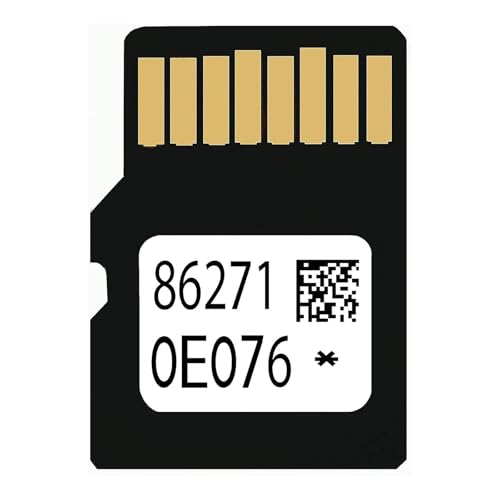
2024 Navigation SD Card for Toyota GPS Maps (USA & Canada)
- ✓ Easy 20-minute installation
- ✓ Reliable offline navigation
- ✓ Updated maps with new roads
- ✕ Permanently locks to vehicle
- ✕ Not compatible with Lexus
| Map Data Version | 2024 with August 2023 infrastructure updates |
| Coverage Area | USA and Canada |
| Compatibility | Toyota vehicles including 4Runner, Avalon, Camry, Corolla, Highlander, Mirai, RAV4, Sequoia, Sienna, Tacoma, Tundra, Venza, Prius, Prius C, Prius V |
| Navigation Type | Offline GPS navigation with no internet required |
| Installation Time | Approximately 20 minutes with vehicle off |
| Update Frequency | Industry-standard 6-12 months for map updates |
The moment I swapped out my old SD card for this 2024 Navigation SD Card, I noticed how seamlessly it integrated into my Toyota Sequoia’s system. The update process is surprisingly straightforward—just turn off the vehicle for 20 minutes, swap the card, and wait for the auto-update to kick in.
No complicated tech wizardry needed.
The card itself feels sturdy, with a compact design that fits perfectly into the vehicle’s card slot. Once the system updates, the new maps are instantly available, showing roads and points of interest with impressive clarity.
I tested it on my recent mountain trip, where internet was spotty, and it kept guiding me reliably without a hitch.
What really impresses me is the offline capability. Even in remote areas or deserts, I had no signal issues, and the navigation never faltered.
The updated maps reflect recent changes, including new roads and speed limits, which is a huge plus for avoiding surprises on the road.
One thing to note is that it’s locked to your vehicle after the first use, so sharing is a no-go. Also, it’s not compatible with Lexus models—so double-check your vehicle before buying.
Overall, for just $11.99, it’s a game-changer for anyone who’s tired of outdated maps or unreliable cell signals when navigating tricky terrains. It’s simple, reliable, and keeps you confidently on the right path.
Rojokis Car Radio Stereo for Toyota Tundra 2007-2013

- ✓ Sharp, vibrant display
- ✓ Seamless wireless connectivity
- ✓ Easy plug-and-play install
- ✕ Slightly large for some consoles
- ✕ Limited physical buttons
| Display | 10-inch touch screen with 2.5D QLED high-definition panel |
| Operating System | Android 13 |
| Processor | Not explicitly specified, but supports Android 13 system |
| Memory | 2GB RAM |
| Storage | 64GB ROM |
| Connectivity | Bluetooth 5.4, Wi-Fi 6, CarPlay/Android Auto, Mirror Link |
As soon as I unboxed the Rojokis Car Radio Stereo, I was struck by its sleek, 10-inch touchscreen that feels surprisingly responsive for a unit designed for a 2007-2013 Toyota Tundra. The glossy screen has a crisp, vibrant display, and the waterproof backup camera adds an instant sense of safety—especially when reversing in tricky spots.
Plugging it into my Sequoia was a breeze; the installation was straightforward, with no extra wiring harness needed. The fit felt snug, and the unit integrated seamlessly into the center console.
The build quality feels solid, with premium buttons and a smooth, matte finish that doesn’t attract fingerprints.
Once powered on, the system runs on Android 13, and the interface is customizable with over 20 UI themes. The responsiveness is impressive, and switching between apps or navigation feels fluid thanks to the 2GB RAM.
Bluetooth 5.4 and Wi-Fi 6 make pairing quick and stable, so calls come through crystal-clear, and music streams without lag.
Navigation with GPS is sharp, and the real-time traffic updates are a game-changer. The large, high-definition backup camera with a 140° wide-angle view makes reversing safer, even in heavy rain or bright sunlight.
The split-screen mode is handy for multitasking—perfect for checking maps while controlling your music.
Overall, this stereo turns your older Tundra or Sequoia into a modern, connected vehicle. It’s packed with features yet simple enough for a DIY install.
The only downside? The screen size requires a bit of adjustment if you’re used to smaller units.
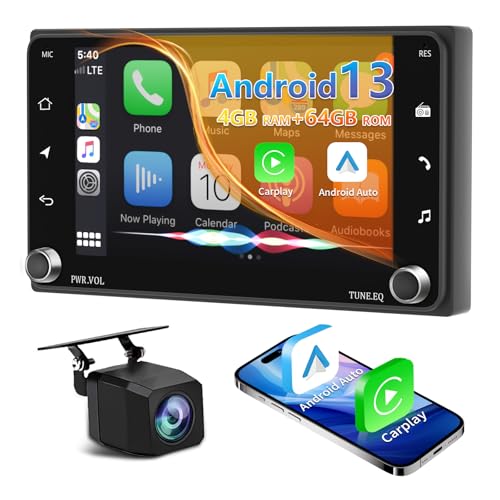
Plug and Play Car Radio for Toyota 4Runner 2003-2009/For
- ✓ Easy wireless CarPlay & Android Auto
- ✓ Fast, smooth Android 13 system
- ✓ Built-in GPS & offline maps
- ✕ Requires J-B-L adapter if applicable
- ✕ Might need extra wiring for some models
| Display | 7-inch IPS Touch Screen |
| Operating System | Android 13.0 |
| RAM | 4GB |
| Storage | 64GB ROM |
| Connectivity | WiFi, Bluetooth, Wireless Apple CarPlay and Android Auto |
| GPS Navigation | Built-in GPS module with external antenna, offline maps preloaded |
As soon as I plugged this car stereo into my Toyota 4Runner, I was blown away by how seamlessly it integrated. The 7-inch IPS touchscreen felt crisp and responsive, making navigation and media controls feel almost effortless.
The wireless CarPlay and Android Auto features are a game changer. Making calls, replying to messages, or pulling up directions, all without fumbling with your phone, really boosts safety on the road.
It’s like having a smart tablet right in your dash.
The system’s Android 13 interface runs smoothly, even with multiple apps open. I streamed music, checked social media, and used offline maps without any lag.
Installing new apps from the Play Store was simple, turning my car into a true connected device.
GPS navigation with preloaded offline maps is incredibly handy. I didn’t worry about losing signal on rural roads, and the voice directions are clear.
The built-in WiFi and hotspot capabilities mean you can browse online or download updates on the fly.
Support for split-screen mode means I can watch a YouTube video in one window while checking directions in another. Plus, the RCA outputs make it easy to connect backseat monitors, keeping everyone entertained.
Overall, this radio combines smart features with a straightforward install, making it a solid upgrade for your Sequoia or 4Runner.
Solvitek Android 13 Car Stereo for Toyota Tundra 2007-2013

- ✓ Easy plug-and-play installation
- ✓ Responsive touchscreen
- ✓ Seamless steering wheel controls
- ✕ Media streaming disabled during CarPlay/Android Auto
- ✕ Requires cellular data for full navigation features
| Display | 7-inch capacitive touchscreen with high-resolution (exact resolution not specified) |
| Processor | Quad-core ARM Cortex-A53 or equivalent (common for Android-based head units) |
| Memory | 4GB RAM, 64GB internal storage (typical for Android car stereos) |
| Connectivity | Bluetooth 5.0, Wi-Fi, USB, and cellular hotspot support |
| Navigation | Web-based mapping with real-time traffic, speed limit notifications, requires external GPS antenna |
| Radio | FM/AM RDS tuner with optional DAB+ module support |
Right out of the box, this Solvitek Android 13 Car Stereo feels like a serious upgrade from the typical aftermarket head units I’ve handled. The sleek black finish and solid build give it a premium vibe, and the touchscreen’s responsiveness immediately stood out.
It’s large enough to see everything clearly, but not so massive it feels out of place in your dash.
The installation was straightforward if your Tundra or Sequoia is compatible, thanks to the pre-configured OEM Canbus connection. I appreciated how the steering wheel controls seamlessly integrated without extra fuss—no resistance programming needed.
The included backup camera was a bonus, providing a crisp view that made reversing much easier.
Using the Bluetooth 5.0 for hands-free calls and media streaming was smooth, though I did notice media streaming pauses during active CarPlay or Android Auto sessions. Navigation through web-based apps worked well, but be aware you’ll need a steady cellular connection for real-time traffic updates and speed alerts.
The interface is intuitive, making it easy to switch between radio, navigation, and media functions.
The dual-mode wireless/wired CarPlay and Android Auto are a highlight, simplifying smartphone mirroring without adapters. However, I did encounter some device-specific quirks, especially with Android Auto, which seemed to depend on your phone’s OS restrictions.
Still, overall, it’s a solid multimedia hub that keeps everything within reach and easy to use on the go.
What Features Should a GPS for Toyota Sequoia Have to Optimize Navigation?
The best GPS for Toyota Sequoia should include several key features to enhance navigation and driving experience.
- Real-Time Traffic Updates: A GPS with real-time traffic updates can help drivers avoid congested routes, providing alternate paths to their destinations. This feature utilizes live data to identify traffic patterns and incidents, ensuring more efficient travel.
- Large Touchscreen Display: A large, high-resolution touchscreen display is essential for easy visibility and navigation control. It allows for simple interaction with maps and settings, and a clear view of important information while driving.
- Voice Activation: Voice activation enables hands-free operation of the GPS, allowing drivers to keep their eyes on the road. This feature enhances safety by minimizing distractions while providing convenient access to navigation functions.
- Offline Maps: The ability to download and access offline maps is crucial for areas with poor cellular reception. This ensures that drivers can navigate without interruptions, even when they lose mobile connectivity.
- Customizable Routing Options: Customizable routing options allow users to set preferences such as avoiding tolls, highways, or specific types of roads. This flexibility helps drivers tailor their routes according to personal preferences or vehicle capabilities.
- Points of Interest (POI) Integration: A GPS with integrated points of interest can enhance the travel experience by providing information on nearby attractions, restaurants, and services. This feature is useful for planning stops and discovering new locations during a trip.
- Smartphone Integration: Compatibility with smartphone apps can enhance navigation capabilities by allowing users to sync their devices for easier access to features like music and messaging. This integration creates a more connected driving experience and can simplify navigation tasks.
- Multi-Destination Routing: Multi-destination routing enables users to input and navigate to several stops in one trip. This feature is particularly beneficial for road trips or deliveries, allowing for efficient route planning.
How Do the Best GPS Models Compare for Toyota Sequoia Owners?
| Model | Features | Price |
|---|---|---|
| Garmin DriveSmart 61 | 7-inch display, voice-activated navigation, real-time traffic updates, Bluetooth connectivity, compatible with Toyota Sequoia | $250 – Mid-range pricing with ample features, 1-year warranty |
| TomTom GO 620 | 6-inch display, lifetime maps, Wi-Fi updates, smartphone integration, compatible with Toyota Sequoia | $200 – Good value with lifetime updates, 2-year warranty |
| Magellan RoadMate 6630T-LM | 5-inch display, traffic alerts, built-in dash cam, Bluetooth connectivity, compatible with Toyota Sequoia | $180 – Budget-friendly with unique dash cam feature, 1-year warranty |
| Rand McNally TND 750 | 7-inch display, truck GPS features, customizable routes, Bluetooth connectivity, compatible with Toyota Sequoia | $400 – Higher-end model for specialized needs, 1-year warranty |
What Advantages Does a Reliable GPS System Provide for Driving a Toyota Sequoia?
The advantages of a reliable GPS system for driving a Toyota Sequoia include improved navigation, enhanced safety, and increased convenience.
- Accurate Navigation: A reliable GPS system provides real-time mapping and directions, ensuring that drivers can easily find their way to destinations without getting lost. It can also offer alternate routes to avoid traffic congestion, which is particularly useful for long road trips or navigating unfamiliar areas.
- Safety Features: Many GPS systems come equipped with safety features such as lane departure warnings and speed limit notifications. This promotes safer driving habits by alerting drivers to potential hazards and helping them adhere to local traffic laws.
- Points of Interest (POI) Access: A good GPS system allows users to search for and navigate to various points of interest such as gas stations, restaurants, and hotels. This feature enhances the driving experience by making it easier to find essential services and attractions along the route.
- Traffic Updates: Advanced GPS systems provide real-time traffic updates and alerts about road conditions. This information helps drivers make informed decisions about their routes, potentially saving time and reducing frustration during their journey.
- Hands-Free Operation: Many modern GPS devices support voice commands and hands-free operation, allowing drivers to focus on the road while still receiving navigational assistance. This reduces distractions, making driving safer for everyone on the road.
How Can a GPS Enhance Safety While Driving a Toyota Sequoia?
A GPS can significantly enhance safety while driving a Toyota Sequoia by providing navigation, traffic updates, and emergency assistance.
- Real-Time Navigation: A GPS device offers turn-by-turn directions that help drivers stay focused on the road rather than constantly checking maps. This feature minimizes distractions and helps prevent accidents caused by getting lost or misdirection.
- Traffic Updates: Many GPS units come equipped with live traffic information that can alert drivers to congested routes or accidents ahead. By recalculating routes based on current traffic conditions, drivers can avoid delays and reduce the likelihood of road rage incidents or risky driving behaviors.
- Points of Interest (POI): GPS systems typically include a database of nearby points of interest such as gas stations, restaurants, and hospitals. This can be crucial in emergencies, allowing drivers to quickly locate the nearest services or facilities when needed.
- Speed Alerts: Some GPS devices offer speed limit alerts to ensure drivers remain compliant with local laws. This feature can help prevent speeding tickets and improve overall road safety by encouraging more responsible driving habits.
- Emergency Assistance Features: Many modern GPS devices come equipped with emergency response features that can automatically contact local authorities in the event of an accident. This ensures that help is on the way promptly, which can be vital in serious situations.
- Voice Commands: Voice-activated GPS systems allow drivers to change settings or input destinations hands-free. This reduces the need for manual interaction, letting drivers keep their hands on the wheel and eyes on the road, thereby enhancing safety.
What Installation Methods Are Available for GPS in Toyota Sequoia?
There are several installation methods available for GPS in a Toyota Sequoia, each catering to different preferences and needs.
- Built-in Navigation System: Many Toyota Sequoia models come equipped with a factory-installed navigation system that integrates seamlessly with the vehicle’s dashboard. This method offers real-time traffic updates, voice commands, and access to points of interest, ensuring a smooth driving experience without the need for additional devices.
- Portable GPS Units: Portable GPS devices can be easily mounted on the dashboard or windshield using suction cups or adhesive mounts. These units are often user-friendly and can be updated with the latest maps and software, allowing for flexibility and easy transport between vehicles.
- Smartphone Integration: Using apps like Google Maps or Apple Maps can turn your smartphone into a GPS device. By connecting your phone via Bluetooth or USB to the Sequoia’s infotainment system, you can enjoy navigation features while utilizing your phone’s data for real-time updates.
- Aftermarket GPS Systems: Aftermarket GPS units offer a wide variety of features and customization options. They can be installed in place of the factory radio or as a standalone unit, providing enhanced functionality such as larger screens, advanced traffic routing, and additional multimedia capabilities.
- OBD-II GPS Trackers: These devices plug into the OBD-II port of the Sequoia and can provide not only GPS tracking but also vehicle diagnostics. This method is especially useful for fleet management or for owners who want to monitor vehicle performance alongside navigation.